
Update (2025-10-16)
The Windows version of Zed has finally been officially released! https://x.com/zeddotdev/status/1978498543464669543?s=46&t=fyB1I730IzIrDNXSUSk92A
You can download it here: https://zed.dev/download
There is no need to use this project unless you have a specific reason.
Introduction
The text editor “Zed” has been getting a lot of attention, but the Windows version had not been officially released as of September 24, 2024. At that time, a manual build was required. To improve this situation, we used GitHub Actions to automatically build Zed daily and create installers.
If you want to try Zed on Windows but have trouble building it, or if you want to manage Zed with the standard Windows system, you can use this project. This is an unofficial build. Use it at your own risk.
Download Zed for Windows
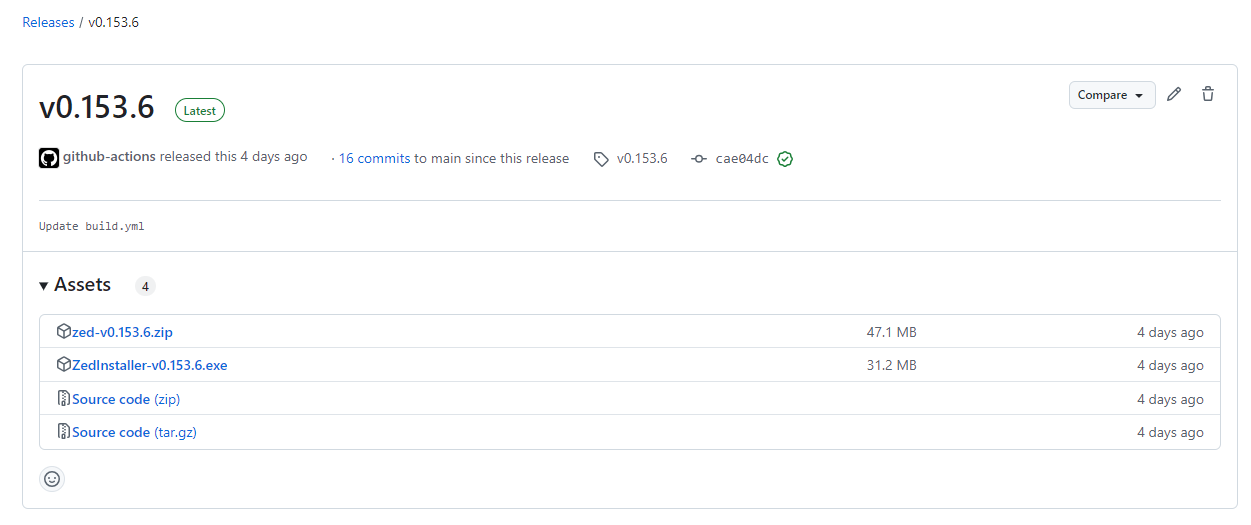
You can download the latest version of Zed from the URL below.
- ZedInstaller-{version}.exe
- This is an installer. You can install Zed anywhere by following the installation wizard.
- zed-{version}.zip
- This is a standalone
zed.exe. After unzipping the archive, you can run the executable as-is.
- This is a standalone

GitHub Actions contents
Below is an explanation of the Actions we created. This is not required to use Zed, so read it only if you are interested.
Automatic build workflow (build.yml)
Show code
name: Build Zed Latest Release
on:
  workflow_dispatch:
  schedule:
    - cron: "0 0 * * *" # Runs every night at midnight UTC
  push:
    branches:
      - main

jobs:
  check:
    runs-on: ubuntu-latest
    outputs:
      latest_tag: ${{ steps.get_latest_tag.outputs.latest_tag }}
      proceed: ${{ steps.compare.outputs.proceed }}

    steps:
      - name: Get latest Zed release tag
        id: get_latest_tag
        env:
          GH_TOKEN: ${{ github.token }}
        run: |
          latestTag=$(gh release list -R zed-industries/zed -L 10 --json tagName,isLatest -q '.[] | select(.isLatest == true) | select(.tagName | startswith("v")) | .tagName')
          echo "Latest Zed release tag: $latestTag"
          echo "latest_tag=$latestTag" >> $GITHUB_OUTPUT

      - name: Get our latest release name
        id: get_our_release
        env:
          GH_TOKEN: ${{ github.token }}
        run: |
          ourLatestRelease=$(gh release list -R ${{ github.repository }} -L 10 --json tagName,isLatest -q '.[] | select(.isLatest == true) | select(.tagName | startswith("v")) | .tagName')
          echo "Our latest release: $ourLatestRelease"
          echo "OUR_LATEST_RELEASE=$ourLatestRelease" >> $GITHUB_ENV

      - name: Compare releases
        id: compare
        run: |
          if [ -z "${{ steps.get_latest_tag.outputs.latest_tag }}" ] || [ "${{ env.OUR_LATEST_RELEASE }}" = "${{ steps.get_latest_tag.outputs.latest_tag }}" ]; then
            echo "Our latest release matches Zed's latest tag. Stopping workflow."
            echo "proceed=false" >> $GITHUB_OUTPUT
          else
            echo "Proceeding with build for Zed's latest tag: ${{ steps.get_latest_tag.outputs.latest_tag }}"
            echo "proceed=true" >> $GITHUB_OUTPUT
          fi

  build:
    needs: check
    runs-on: windows-latest
    if: needs.check.outputs.proceed == 'true'

    steps:
      - name: Checkout Zed repository
        uses: actions/checkout@v3
        with:
          repository: zed-industries/zed
          ref: ${{ needs.check.outputs.latest_tag }}
          fetch-depth: 1

      - name: Set up for build
        run: |
          echo "Ready to build ${{ needs.check.outputs.latest_tag }}"

      - name: Install rust nightly
        uses: actions-rs/toolchain@v1
        with:
          toolchain: nightly
          override: true
          target: wasm32-wasi

      - name: Rust Cache
        uses: Swatinem/[email protected]

      - name: Build release
        uses: actions-rs/cargo@v1
        with:
          command: build
          args: --release

      - name: Archive build
        uses: actions/upload-artifact@v4
        with:
          name: zed-release
          path: target/release/zed.exe

  create_installer:
    needs: [check, build]
    runs-on: windows-latest
    if: needs.check.outputs.proceed == 'true'

    steps:
      - name: Checkout our repository
        uses: actions/checkout@v3

      - name: Download Zed build artifact
        uses: actions/download-artifact@v4
        with:
          name: zed-release
          path: zed-release

      - name: Update Inno Setup script version
        run: |
          $content = Get-Content -Path zed_setup.iss -Raw
          $newContent = $content -replace '#define MyAppVersion ".*"', '#define MyAppVersion "${{ needs.check.outputs.latest_tag }}"'
          $newContent | Set-Content -Path zed_setup.iss -NoNewline

      - name: Compile Setup Wizard
        uses: Minionguyjpro/[email protected]
        with:
          path: zed_setup.iss
          options: /O+

      - name: Upload Inno Setup Installer
        uses: actions/upload-artifact@v4
        with:
          name: zed-installer
          path: Output/ZedInstaller-${{ needs.check.outputs.latest_tag }}.exe

  release:
    needs: [check, build, create_installer]
    runs-on: ubuntu-latest
    permissions:
      contents: write
    if: needs.check.outputs.proceed == 'true'

    steps:
      - name: Download Inno Setup Installer
        uses: actions/download-artifact@v4
        with:
          name: zed-installer
          path: zed-installer

      - name: Download non-installer executable
        uses: actions/download-artifact@v4
        with:
          name: zed-release
          path: zed-release

      - name: Zip the non-installer executable
        run: zip zed-${{ needs.check.outputs.latest_tag }}.zip zed-release/zed.exe

      - name: Upload release artifacts to GitHub Release
        uses: softprops/action-gh-release@v2
        with:
          name: ${{ needs.check.outputs.latest_tag }}
          tag_name: ${{ needs.check.outputs.latest_tag }}
          draft: false
          make_latest: true
          files: |
            zed-installer/ZedInstaller-${{ needs.check.outputs.latest_tag }}.exe
            zed-${{ needs.check.outputs.latest_tag }}.zip
Workflow overview
This workflow consists of the following jobs:
checkjob: Gets the latest release tag from Zed’s release page and compares it with the latest release in this repository. The following jobs run only if the releases are different.buildjob: Builds Zed on Windows.create_installerjob: Creates a Windows installer from the built executable file.releasejob: Uploads the built executable and installer to the GitHub release page.
Detailed explanation of workflow files
1. Trigger settings
name: Build Zed Latest Release
on:
  workflow_dispatch: # manual trigger
  schedule:
    - cron: "0 0 * * *" # Runs every night at midnight (UTC)
  push:
    branches:
      - main # Run when pushing to main branch
This workflow runs every night at midnight UTC, when triggered manually by workflow_dispatch, or when changes are pushed to the main branch.
2. check job
jobs:
  check:
    runs-on: ubuntu-latest
    outputs:
      latest_tag: ${{ steps.get_latest_tag.outputs.latest_tag }}
      proceed: ${{ steps.compare.outputs.proceed }}
This job retrieves Zed’s latest release tag and compares it to the latest release tag in my repository.
Get the latest tag
      - name: Get latest Zed release tag
        id: get_latest_tag
        env:
          GH_TOKEN: ${{ github.token }}
        run: |
          latestTag=$(gh release list -R zed-industries/zed -L 10 --json tagName,isLatest -q '.[] | select(.isLatest == true) | select(.tagName | startswith("v")) | .tagName')
          echo "Latest Zed release tag: $latestTag"
          echo "latest_tag=$latestTag" >> $GITHUB_OUTPUT
This step gets the latest release tag from Zed’s release page, limited to tags that start with v.
Compare with this repository’s release tag
      - name: Get our latest release name
        id: get_our_release
        env:
          GH_TOKEN: ${{ github.token }}
        run: |
          ourLatestRelease=$(gh release list -R ${{ github.repository }} -L 10 --json tagName,isLatest -q '.[] | select(.isLatest == true) | select(.tagName | startswith("v")) | .tagName')
          echo "Our latest release: $ourLatestRelease"
          echo "OUR_LATEST_RELEASE=$ourLatestRelease" >> $GITHUB_ENV
This uses the gh CLI to get the latest release of this repository.
      - name: Compare releases
        id: compare
        run: |
          if [ -z "${{ steps.get_latest_tag.outputs.latest_tag }}" ] || [ "${{ env.OUR_LATEST_RELEASE }}" = "${{ steps.get_latest_tag.outputs.latest_tag }}" ]; then
            echo "Our latest release matches Zed's latest tag. Stopping workflow."
            echo "proceed=false" >> $GITHUB_OUTPUT
          else
            echo "Proceeding with build for Zed's latest tag: ${{ steps.get_latest_tag.outputs.latest_tag }}"
            echo "proceed=true" >> $GITHUB_OUTPUT
If Zed’s latest release matches this repository’s latest release, the workflow stops. If they do not match, the build job runs.
3. build job
  build:
    needs: check
    runs-on: windows-latest
    if: needs.check.outputs.proceed == 'true'
This job will only build Zed in a Windows environment if Zed’s latest release tag has been updated.
Check out Zed’s repository
      - name: Checkout Zed repository
        uses: actions/checkout@v3
        with:
          repository: zed-industries/zed
          ref: ${{ needs.check.outputs.latest_tag }}
          fetch-depth: 1
Check out Zed’s repository at the latest tag.
Rust setup and build
      - name: Install rust nightly
        uses: actions-rs/toolchain@v1
        with:
          toolchain: nightly
          override: true
          target: wasm32-wasi

      - name: Rust Cache
        uses: Swatinem/[email protected]

      - name: Build release
        uses: actions-rs/cargo@v1
        with:
          command: build
          args: --release
Set up Rust’s nightly toolchain and run the build. The built artifact (zed.exe) is uploaded as an artifact.
      - name: Archive build
        uses: actions/upload-artifact@v4
        with:
          name: zed-release
          path: target/release/zed.exe
4. create_installer job
This job creates a Windows installer from Zed’s build artifacts.
  create_installer:
    needs: [check, build]
    runs-on: windows-latest
    if: needs.check.outputs.proceed == 'true'
Inno Setup script updates
      - name: Update Inno Setup script version
        run: |
          $content = Get-Content -Path zed_setup.iss -Raw
          $newContent = $content -replace '#define MyAppVersion ".*"', '#define MyAppVersion "${{ needs.check.outputs.latest_tag }}"'
          $newContent | Set-Content -Path zed_setup.iss -NoNewline
Replace the application version with the latest release tag in the Inno Setup script.
Compiling the installer
      - name: Compile Setup Wizard
        uses: Minionguyjpro/[email protected]
        with:
          path: zed_setup.iss
          options: /O+
Compile the installer using Inno Setup.
Uploading the installer as an artifact
      - name: Upload Inno Setup Installer
        uses: actions/upload-artifact@v4
        with:
          name: zed-installer
          path: Output/ZedInstaller-${{ needs.check.outputs.latest_tag }}.exe
5. release job
Finally, upload the built artifacts and installer to your GitHub release.
  release:
    needs: [check, build, create_installer]
    runs-on: ubuntu-latest
    permissions:
      contents: write
    if: needs.check.outputs.proceed == 'true'
Downloading and uploading artifacts
      - name: Download Inno Setup Installer
        uses: actions/download-artifact@v4
        with:
          name: zed-installer
          path: zed-installer

      - name: Download non-installer executable
        uses: actions/download-artifact@v4
        with:
          name: zed-release
          path: zed-release

      - name: Zip the non-installer executable
        run: zip zed-${{ needs.check.outputs.latest_tag }}.zip zed-release/zed.exe

      - name: Upload release artifacts to GitHub Release
        uses: softprops/action-gh-release@v2
        with:
          name: ${{ needs.check.outputs.latest_tag }}
          tag_name: ${{ needs.check.outputs.latest_tag }}
          draft: false
          make_latest: true
          files: |
            zed-installer/ZedInstaller-${{ needs.check.outputs.latest_tag }}.exe
            zed-${{ needs.check.outputs.latest_tag }}.zip
The built artifact and installer are uploaded to this repository’s GitHub release.
Detailed explanation of Inno Setup script
Inno Setup is an open-source tool for creating Windows installers. I use a script like this.
Show code
#define MyAppName "Zed"
#define MyAppVersion "0.0.0"  ; This will be dynamically updated by the workflow
#define MyAppPublisher "Zed Industries"
#define MyAppExeName "zed.exe"

[Setup]
; NOTE: The value of AppId uniquely identifies this application. Do not use the same AppId value in installers for other applications.
; Generate a new GUID for your application using the command [guid]::NewGuid() in PowerShell or an online GUID generator.
AppId={{DEC54CF2-B010-495E-A78B-BD7E1DED610A}
AppName={#MyAppName}
AppVersion={#MyAppVersion}
AppPublisher={#MyAppPublisher}
DefaultDirName={autopf}\{#MyAppName}
DisableProgramGroupPage=yes
OutputBaseFilename=ZedInstaller-{#MyAppVersion}
Compression=lzma
SolidCompression=yes
WizardStyle=modern
UninstallDisplayIcon={app}\{#MyAppExeName}
ChangesAssociations=yes

[Languages]
Name: "english"; MessagesFile: "compiler:Default.isl"

[Tasks]
Name: "desktopicon"; Description: "{cm:CreateDesktopIcon}"; GroupDescription: "{cm:AdditionalIcons}"; Flags: unchecked
Name: "quicklaunchicon"; Description: "{cm:CreateQuickLaunchIcon}"; GroupDescription: "{cm:AdditionalIcons}"; Flags: unchecked; OnlyBelowVersion: 6.1; Check: not IsAdminInstallMode
Name: "associatefiles"; Description: "Associate Zed with all file types"; GroupDescription: "File associations:"; Flags: unchecked

[Files]
Source: "zed-release\zed.exe"; DestDir: "{app}"; Flags: ignoreversion

[Icons]
Name: "{autoprograms}\{#MyAppName}"; Filename: "{app}\{#MyAppExeName}"
Name: "{autodesktop}\{#MyAppName}"; Filename: "{app}\{#MyAppExeName}"; Tasks: desktopicon
Name: "{userappdata}\Microsoft\Internet Explorer\Quick Launch\{#MyAppName}"; Filename: "{app}\{#MyAppExeName}"; Tasks: quicklaunchicon

[Registry]
Root: HKCR; Subkey: "*\shell\{#MyAppName}"; ValueType: string; ValueName: ""; ValueData: "Open with {#MyAppName}"; Flags: uninsdeletekey
Root: HKCR; Subkey: "*\shell\{#MyAppName}\command"; ValueType: string; ValueName: ""; ValueData: """{app}\{#MyAppExeName}"" ""%1"""; Flags: uninsdeletekey
Root: HKCR; Subkey: "Applications\{#MyAppExeName}\shell\open\command"; ValueType: string; ValueName: ""; ValueData: """{app}\{#MyAppExeName}"" ""%1"""; Flags: uninsdeletekey

[Code]
procedure CurStepChanged(CurStep: TSetupStep);
var
  ResultCode: Integer;
begin
  if CurStep = ssPostInstall then
  begin
    if WizardIsTaskSelected('associatefiles') then
    begin
      // Associate Zed with all file types
      Exec(ExpandConstant('{sys}\ftype.exe'), '.=ZedFile', '', SW_HIDE, ewWaitUntilTerminated, ResultCode);
      Exec(ExpandConstant('{sys}\assoc.exe'), '.=ZedFile', '', SW_HIDE, ewWaitUntilTerminated, ResultCode);
    end;
  end;
end;

procedure CurUninstallStepChanged(CurUninstallStep: TUninstallStep);
var
  ResultCode: Integer;
begin
  if CurUninstallStep = usPostUninstall then
  begin
    // Remove desktop icon
    DeleteFile(ExpandConstant('{userdesktop}\{#MyAppName}.lnk'));

    // Remove Quick Launch icon
    DeleteFile(ExpandConstant('{userappdata}\Microsoft\Internet Explorer\Quick Launch\{#MyAppName}.lnk'));

    // Remove file associations
    Exec(ExpandConstant('{sys}\ftype.exe'), 'ZedFile=', '', SW_HIDE, ewWaitUntilTerminated, ResultCode);
    Exec(ExpandConstant('{sys}\assoc.exe'), '.=', '', SW_HIDE, ewWaitUntilTerminated, ResultCode);

    // Clean up registry
    RegDeleteKeyIncludingSubkeys(HKCR, '*\shell\{#MyAppName}');
    RegDeleteKeyIncludingSubkeys(HKCR, 'Applications\{#MyAppExeName}');
  end;
end;
Workflow for specific version build (build-specific-zed-version.yml)
Show code
name: Build Specific Zed Version
on:
  workflow_dispatch:
    inputs:
      zed_version:
        description: 'Zed version to build (e.g., v0.100.0)'
        required: true
        type: string

jobs:
  check:
    runs-on: ubuntu-latest
    outputs:
      version_exists: ${{ steps.check_tag.outputs.exists }}
    steps:
      - name: Check if version exists
        id: check_tag
        env:
          GH_TOKEN: ${{ github.token }}
        run: |
          if gh release view ${{ github.event.inputs.zed_version }} --repo zed-industries/zed &> /dev/null; then
            echo "Version ${{ github.event.inputs.zed_version }} exists."
            echo "exists=true" >> $GITHUB_OUTPUT
          else
            echo "Version ${{ github.event.inputs.zed_version }} does not exist."
            echo "exists=false" >> $GITHUB_OUTPUT
          fi

  build:
    needs: check
    runs-on: windows-latest
    if: needs.check.outputs.version_exists == 'true'
    steps:
      - name: Checkout Zed repository
        uses: actions/checkout@v3
        with:
          repository: zed-industries/zed
          ref: ${{ github.event.inputs.zed_version }}
          fetch-depth: 1

      - name: Set up for build
        run: |
          echo "Ready to build ${{ github.event.inputs.zed_version }}"

      - name: Install rust nightly
        uses: actions-rs/toolchain@v1
        with:
          toolchain: nightly
          override: true
          target: wasm32-wasi

      - name: Rust Cache
        uses: Swatinem/[email protected]

      - name: Build release
        uses: actions-rs/cargo@v1
        with:
          command: build
          args: --release

      - name: Archive build
        uses: actions/upload-artifact@v4
        with:
          name: zed-release
          path: target/release/zed.exe

  create_installer:
    needs: [check, build]
    runs-on: windows-latest

    steps:
      - name: Checkout our repository
        uses: actions/checkout@v3

      - name: Download Zed build artifact
        uses: actions/download-artifact@v4
        with:
          name: zed-release
          path: zed-release

      - name: Update Inno Setup script version
        run: |
          $content = Get-Content -Path zed_setup.iss -Raw
          $newContent = $content -replace '#define MyAppVersion ".*"', '#define MyAppVersion "${{ github.event.inputs.zed_version }}"'
          $newContent | Set-Content -Path zed_setup.iss -NoNewline

      - name: Compile Setup Wizard
        uses: Minionguyjpro/[email protected]
        with:
          path: zed_setup.iss
          options: /O+

      - name: Upload Inno Setup Installer
        uses: actions/upload-artifact@v4
        with:
          name: zed-installer
          path: Output/ZedInstaller-${{ github.event.inputs.zed_version }}.exe

  release:
    needs: [check, build, create_installer]
    runs-on: ubuntu-latest
    permissions:
      contents: write

    steps:
      - name: Download Inno Setup Installer
        uses: actions/download-artifact@v4
        with:
          name: zed-installer
          path: zed-installer

      - name: Download non-installer executable
        uses: actions/download-artifact@v4
        with:
          name: zed-release
          path: zed-release

      - name: Zip the non-installer executable
        run: zip zed-${{ github.event.inputs.zed_version }}.zip zed-release/zed.exe

      - name: Upload release artifacts to GitHub Release
        uses: softprops/action-gh-release@v2
        with:
          name: ${{ github.event.inputs.zed_version }}
          tag_name: ${{ github.event.inputs.zed_version }}
          draft: false
          files: |
            zed-installer/ZedInstaller-${{ github.event.inputs.zed_version }}.exe
            zed-${{ github.event.inputs.zed_version }}.zip
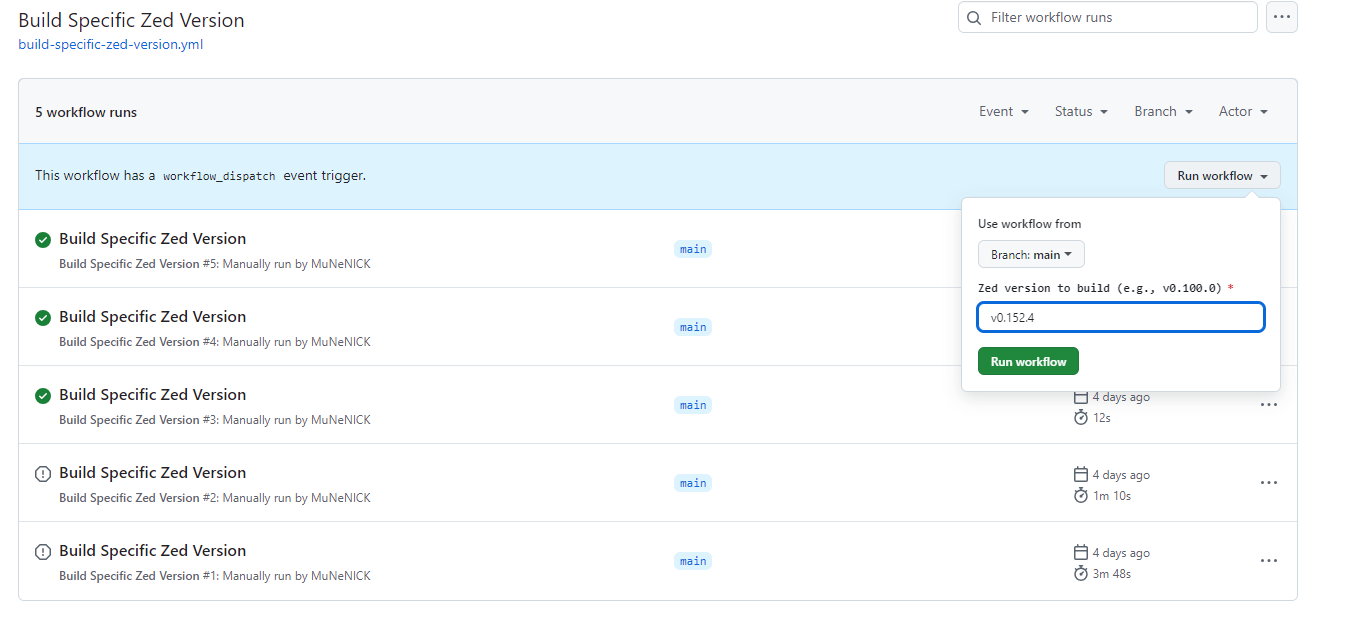
This workflow builds a specified version of Zed. Pre-releases are not built automatically, so you can build the Windows version by using this workflow and manually specifying the version.
The content is almost the same as the daily build workflow, so only the differences are explained below.
Version input via workflow_dispatch
workflow_dispatch:
  inputs:
    zed_version:
      description: 'Zed version to build (e.g., v0.100.0)'
      required: true
      type: string
This workflow takes a specific Zed version as input when triggered manually. When a user specifies zed_version, such as v0.100.0, that version is built.
Conclusion
I created the script above while studying GitHub Actions.
You can fork these GitHub Actions workflows and use them in your own repository.
If you need to build a specific version, fork the repository and run the Build Specific Zed Version workflow.